
What is Webmail?
Webmail lets you access your domain email accounts (like info@yourdomain.lk) directly from a browser — no setup required on Gmail, Outlook, or mobile apps.
How to Login to Webmail
Follow these steps to open Webmail:
-
In your browser, go to:
https://yourdomain.lk/webmail -
Enter your full email address (e.g.,
yourname@yourdomain.lk)
and the email password you created in cPanel. -
Click Login.
-
Once logged in, choose a webmail app like Roundcube or Horde (we recommend Roundcube for a modern interface).
2nd option
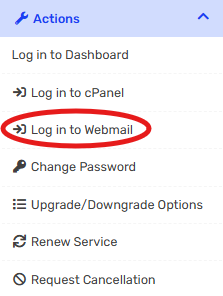
You can also log in via the client area athttps://www.manage.inventiumhostingsolutions.com/clients > My Services >
✅ You’re now ready to send and receive emails!
Common Issues
-
Wrong password? Reset it from your cPanel > Email Accounts > Manage.
-
Can’t access Webmail? Make sure your domain is pointing to our nameservers.
-
Or log in via the client area:
????https://manage.inventiumhostingsolutions.com→ My Services → Login to Webmail
Summary
Webmail is the easiest way to manage your domain-based emails from any device. It’s included free with every hosting plan at Inventium Hosting Solutions.
